Automated Order Release Stop Manually Deciding What Ships

Automated Order Release- Stop Manually Deciding What Ships

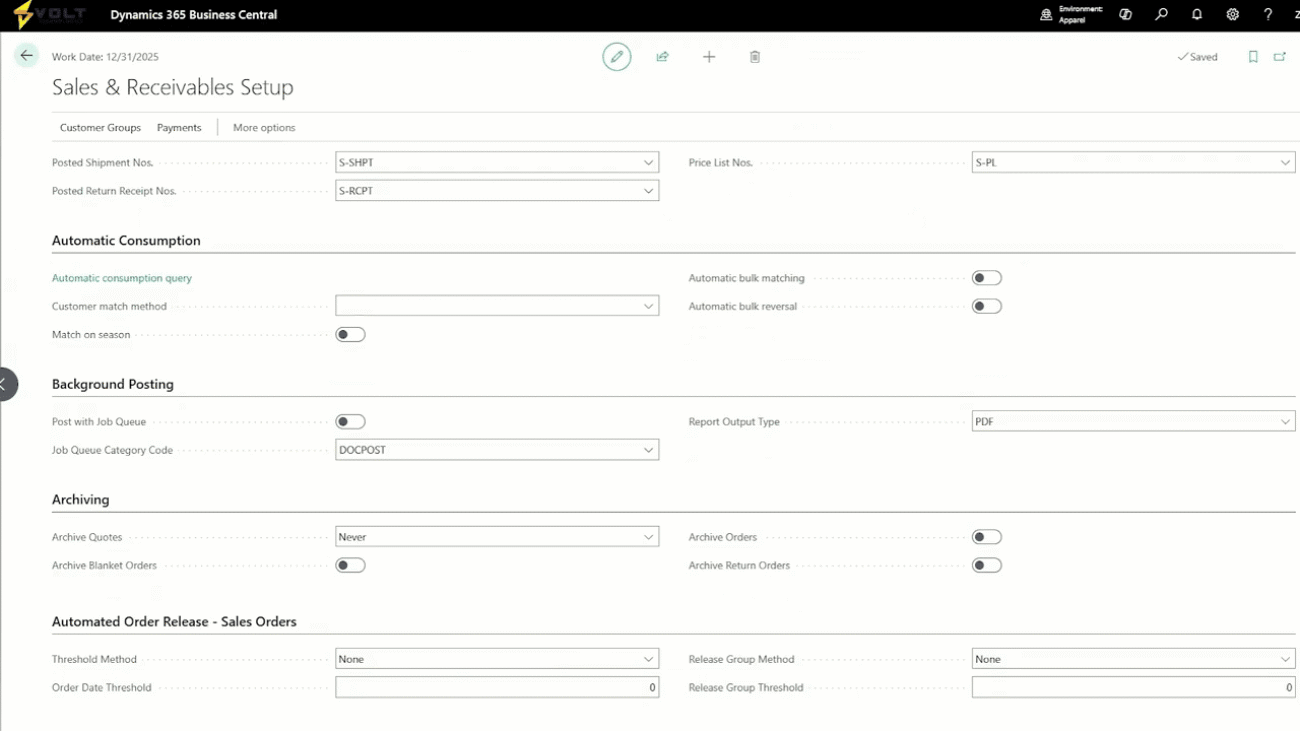
This demonstration explains how to configure and use automated order release in conjunction with soft allocation planning. The presenter walks through setting up various threshold parameters including price, quantity, and release group methods at different levels – from sales and receivable setup to individual customer cards and specific orders. Using Trey Research as an example, they show how customers can set minimum thresholds for partial shipments, such as requiring at least 50% or 75% completion before release. The demo includes running automated order release in simulation mode, reviewing the summary results, and examining detailed logs that show validation steps for each order line.

The example concludes by showing how the system would release four lines from a sales order based on allocation status, demonstrating the practical application of these automated processes for inventory and order management.

Soft Allocation How Apparel Brands Prioritize the Right Orders Every Time

Soft Allocation- How Apparel Brands Prioritize the Right Orders Every Time

This demonstration walks through the setup and configuration of soft allocation functionality for inventory management. The presenter explains how customers can prioritize specific demand and supply to allocate inventory correctly across different customers and transactions. The setup process involves four key components: demand sequences (which prioritize different order types like ecommerce, wholesale, forecasts, and specific customers), supply sequences (which determine allocation sources starting with on-hand inventory, then purchase orders, then transfer orders), period templates (which configure time-based allocation periods), and soft allocation plans (which bring all components together).

The demo shows a practical example using sales order 97, demonstrating how the system allocates inventory based on the configured priorities and displays allocation results through inquiry screens. The presenter emphasizes that soft allocation creates reservations to help visualize potential inventory allocation scenarios before making final commitments.

The Fastest Way to Enter Large Apparel Orders (Without Losing Your Mind)

The Fastest Way to Enter Large Apparel Orders (Without Losing Your Mind)

This demonstration walks through enhanced sales order functionality in Business Central, showcasing automated order entry features designed to streamline the traditionally tedious process of manual order creation. The presenter explains two key automation tools: an Excel template export feature that allows users to create templates for bulk order uploads, and a transaction matrix feature that simplifies variant selection. The transaction matrix is highlighted as a particularly valuable feature that enables users to quickly add multiple product variants with different quantities using a visual grid interface, rather than entering each variant line by line.

The demo includes practical examples using B2B and B2C orders, showing how these tools can significantly reduce time spent on order entry tasks.

Managing Style, Size & Color Without SKU Chaos

Managing Style, Size & Color Without SKU Chaos

This demonstration showcases enhanced SKU management features built for Dynamics 365 Business Central, focusing on apparel inventory management. The presenter walks through the items card interface, highlighting new capabilities including granular item status controls that allow blocking specific transaction types (like receiving or shipping) rather than all transactions. Key features include style numbers, item types, main item numbers, item phase codes, and sample designations. The main focus is on the item variant dimensions template system, which introduces product dimensions like color and size to Business Central’s variant system.

Using a T-shirt example, the demo shows how to select template dimension values for colors (yellow, red, navy, black, tan, granite) and sizes (extra small to extra extra large), and how the system can automatically suggest and create all possible variant combinations. The presenter also mentions integration with color groups and size ranges that can be associated with item categories for automated dimension selection.

Inside Volt 365 Apparel A Unified Platform From Design to Delivery

Inside Volt 365 Apparel- A Unified Platform From Design to Delivery

This is the opening of a webinar focused on transforming apparel operations using Microsoft ERP from design to delivery. The presenter introduces Evolve Technologies and their apparel IP solutions built on Business Central. The webinar will demonstrate key features including inventory seasonality and dimensionality SKU management, easier order entry using Excel spreadsheets and transaction matrices, and a soft allocation engine with automated order release management.

The presenter emphasizes that while they’ve selected specific features for the webinar demonstration, there are many more capabilities available and encourages participants to reach out with questions about additional features they’d like to explore.

Volt Rebrand Launch Video Apparel

Volt Rebrand Launch Video – Apparel

This video explains why most AI agent implementations fail and introduces a new four-layer technology stack that businesses need to understand for 2026. The speaker argues that 95% of AI projects fail not because agents aren’t smart enough, but because the underlying data and processes aren’t strong enough to support them. The four layers are: systems of record (ERP, CRM as the foundation), context layer (unstructured data like emails and meetings), agentic layer (AI agents that perform actions), and human orchestration layer (people managing and directing agents).

The video emphasizes that companies must have solid foundations in their systems of record and well-managed context before deploying agents. The human layer is identified as the most important, where people become orchestrators rather than system users. The speaker provides actionable advice for auditing each layer and warns that companies focusing on only one layer will miss the bigger opportunity.