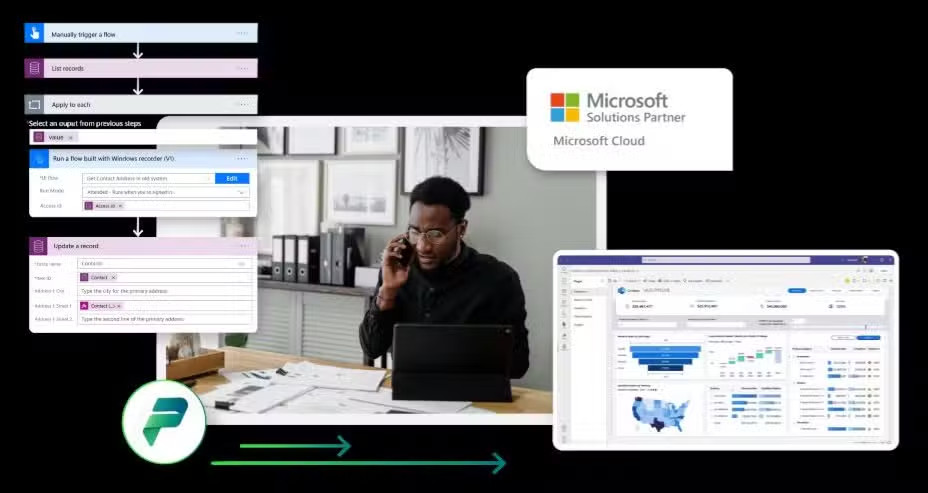
Build apps, automate work, and turn data into action. A low-code platform with AI assistance built in, so every team can innovate faster.
Power Platform combines Power Apps, Power Automate, Power BI, and Power Pages to help organizations analyze data, build solutions, and automate processes, now with Copilot to accelerate development and reduce repetitive work.
Microsoft Power Platform is a low-code application platform that helps organizations analyze data, build solutions, automate processes, and create business websites, all connected through a secure, governed data foundation.
With Copilot AI built in, teams can describe what they need in natural language and get working apps, flows, and reports faster than ever. Power Platform bridges the gap between business needs and IT capacity.
Power Apps
Build custom apps connected to your data, run on any device, no code required.
Power Automate
Automate workflows across apps and services to eliminate repetitive tasks.
Power BI
Turn data into actionable insights with interactive reports and dashboards.
Dataverse
A unified data foundation with built-in governance and security.
Power Pages
Create secure, low-code business websites for external users.
Copilot Studio
Build and deploy custom AI copilots and agents for your business needs.
Latest Updates
What's New in Power Platform
Recent capabilities from Microsoft's latest release wave, bringing AI assistance and enhanced governance across the platform.
Power Apps
Copilot in Power Apps helps build apps from natural language descriptions
Modern controls with improved accessibility and theming options
Power Automate
Copilot-assisted flow creation describes automation in plain English
Process mining insights help identify automation opportunities
Power BI
Copilot generates reports, summaries, and narrative insights from data
Enhanced semantic models improve data governance and reusability
Power Pages
Copilot assists with page creation and content generation
Enhanced security features for external-facing sites
Dataverse & Admin
Managed Environments provide additional governance controls
Improved DLP policies and connector management at scale
Copilot Studio
Build custom copilots and AI agents without code
Deploy agents across Teams, websites, and business apps
Agentic Work
Copilot + AI in Power Platform
Microsoft Copilot is embedded across Power Platform to help you build faster, automate smarter, and get insights without deep technical expertise. Describe what you need, Copilot does the heavy lifting.
AI Builder extends these capabilities with prebuilt and custom AI models for document processing, prediction, and object detection, no data science background required.
Build Apps with Natural Language
Describe what you need, and Copilot in Power Apps generates tables, screens, and logic to get you started.
Create Flows by Describing Them
Tell Copilot what you want to automate, and it drafts the flow, saving hours of manual configuration.
Generate Reports and Summaries
Ask questions about your data in plain language; Copilot creates visuals and narrative summaries.
Accelerate Page Creation
Copilot helps draft page content and layouts for secure external-facing business sites.
Document and Describe Solutions
Copilot can explain existing apps and flows, making it easier to maintain and hand off solutions.
Use Cases by Business Function
Power Platform adapts to how your teams actually work, whether finance, ops, HR, or IT.
Finance
Expense Approvals & Reporting
Automate expense submission and approval workflows; surface spend insights in real-time dashboards.
A complete suite to analyze, build, and automate, each enhanced with Copilot AI.
Power BI: Turn Data Into Insights
The leading unified self-service and enterprise BI platform. Connect to any data source, Dynamics 365, Excel, databases, or third-party apps and transform it into actionable intelligence.
Interactive reports and real-time dashboards
Copilot generates summaries and answers questions in natural language
Reusable semantic models for consistent enterprise reporting
Mobile access and embedded analytics for any application
Best for: Organizations needing unified analytics and data-driven decisions
Power Apps: Build Apps Without Code
Create custom business applications with a drag-and-drop interface. Connect to your data, design screens, and publish apps that run on any device, web, tablet, or mobile.
Canvas apps for pixel-perfect custom interfaces
Model-driven apps for data-centric business processes
Copilot helps generate app structures from descriptions
500+ pre-built connectors to data sources and services
Best for: Teams needing custom apps without developer resources
Power Automate: Connect and Automate Everything
Automate repetitive tasks and orchestrate workflows across applications. From simple approvals to complex multi-step processes with conditional logic and AI.
Cloud flows for cross-application automation
Desktop flows (RPA) for legacy system automation
Copilot drafts flows from natural language descriptions
Process mining to discover automation opportunities
Best for: Operations teams looking to eliminate manual, repetitive tasks
Optimize Your Business with Power Automate
Learn how Microsoft Power Automate accelerates workflows, automates routine tasks, and boosts productivity using low-code automation backed by cloud and AI.
Power Platform gives IT the controls to enable citizen development safely. Set guardrails, manage environments, and maintain visibility, while still empowering teams to build what they need.
Managed Environments for additional admin controls
Tenant isolation and geo-residency options
Integration with Microsoft Purview for compliance
Center of Excellence starter kit for governance best practices
Environment Strategy
Organize dev, test, and production environments with clear boundaries and permissions.
Data Loss Prevention (DLP) Policies
Control which connectors can be used together to prevent unauthorized data sharing.
Connector Governance
Manage which connectors are available and block unsanctioned third-party services.
Monitoring & Analytics
Track usage, identify unused resources, and surface adoption insights with admin analytics.
Security & Permissions Model
Leverage Dataverse security roles, row-level security, and Azure AD integration.
ALM & DevOps Best Practices
Implement application lifecycle management with pipelines for controlled deployments.
Seamless Microsoft Ecosystem Connections
Power Platform integrates natively with the Microsoft stack, Dynamics 365, Microsoft 365, Azure, and Copilot, plus hundreds of third-party connectors.
Microsoft 365
Integrate with Excel, SharePoint, Teams, and Outlook for seamless collaboration.
Dynamics 65 Business Central
Connect Power Platform to your ERP for unified data and automated workflows.
Dynamics 365 Sales (CRM)
Extend CRM capabilities with custom apps, automation, and analytics
Microsoft Azure
Enterprise integrations with Azure Logic Apps, Functions, and data services.
Copilot & Copilot Studio
Build custom AI agents and extend Copilot capabilities across your workflows.
Why Volt for Power Platform
We help you move from ideas to working solutions, with the architecture, governance, and support to scale confidently.
Use Case Discovery & Prioritization
We identify high-impact automation and app opportunities, focused on outcomes, not just features.
Solution Architecture & Dataverse Design
Build on a solid foundation with proper data modeling, security roles, and integration patterns.
Automation & App Delivery Sprints
Rapid, iterative delivery of apps and flows, low-code done right, with quality and maintainability.
Governance & Environment Strategy
Set up environments, DLP policies, and admin controls so innovation scales safely.
Copilot Enablement
Activate Copilot features where they add value, with training and change management to drive adoption.
Continuous Improvement & Managed Optimization
Ongoing support to refine solutions, add new use cases, and keep pace with platform updates.
Most Business Central projects do not fail because the software was the wrong fit. They stall because nobody wrote down what “ready to go live” means before work started. Finance assumed IT owned data migration. IT assumed the partner owned it. Four months in, the opening balances do not tie out and the date has slipped a quarter.
The Payables Agent caps at 100 emails a day. Attachments have to be under 5MB and no longer than ten pages.
Whether that works for you depends entirely on your AP volume, and those numbers appear nowhere near the announcement.
Most mid-market leaders have now sat through the Copilot demo. Someone from finance asks the obvious question afterwards and rarely gets a straight answer: what changes on Monday morning?
See how Kirsch International moved from spreadsheets to Microsoft Dynamics 365 Business Central and Volt 365 Apparel, with order entry now 5 to 10 times faster.
Discover how Volt Technologies built an AI agent for Microsoft Dynamics 365 Business Central, helping Loan Vision deliver faster support and smarter customer experiences.
This live session will explore how integrating Microsoft’s powerful ERP and CRM tools can transform how your business manages everything from financials and operations to sales and customer engagement.
Whether you’re a seasoned Business Central user or new to ERP solutions, this webinar will provide valuable insights, best practices, and live demos to help you take your business operations to the next level in 2025.
Gain actionable insights, learn best practices, and see how Business Central can help you close out 2024 on a high note and start 2025 with confidence.
Microsoft Power Platform is a low-code application platform that combines Power Apps, Power Automate, Power BI, Power Pages, and Dataverse. It helps organizations analyze data, build custom apps, automate workflows, and create business websites, all without extensive coding.
Do I need coding skills to use Power Platform?
No. Power Platform is designed for users with varying technical skills. With drag-and-drop builders and Copilot AI assistance, you can create apps, automations, and reports by describing what you need in plain language.
How does Copilot work in Power Platform?
Copilot is embedded across Power Platform to help you build faster. In Power Apps, describe your app and Copilot generates tables and screens. In Power Automate, describe a workflow and Copilot drafts the flow. In Power BI, ask questions about your data in natural language.
How do we govern citizen development at scale?
Power Platform provides robust admin controls: environment strategies, Data Loss Prevention (DLP) policies, connector governance, and Managed Environments. The Center of Excellence starter kit offers additional governance templates and analytics.
Does Power Platform integrate with Dynamics 365?
Yes. Power Platform integrates seamlessly with Dynamics 365 Business Central, Sales, and other Dynamics 365 apps. Dataverse serves as the shared data foundation, enabling apps and automations to work directly with your ERP and CRM data.
What is Dataverse and do I need it?
Dataverse is the underlying data platform for Power Platform. It provides a secure, governed data foundation with built-in security roles, audit logging, and business logic. While you can build with other data sources, Dataverse unlocks the full platform capabilities.
How does Volt help with Power Platform?
Volt helps with use case discovery, solution architecture, governance setup, and hands-on delivery of apps and automations. We also provide Copilot enablement, training, and ongoing managed optimization to keep your solutions evolving.
What's the difference between Power Automate and Azure Logic Apps?
Both handle workflow automation, but Power Automate is designed for business users with a simpler interface, while Azure Logic Apps targets developers and enterprise-scale integrations. They share the same connector ecosystem and can work together.
Ready to Automate and Innovate with Power Platform?
Volt helps you build secure, scalable solutions, and activate AI features responsibly. Let's identify your highest-impact use cases and get started.