Turn work data into real action. Copilot is your AI assistant, grounded in your organization’s knowledge, permissions, and context, while agents handle tasks autonomously alongside you.
Microsoft is building the future of work around human-agent collaboration. Copilot + agents transform how work gets done, securely and at scale.
Microsoft 365 Copilot is your AI assistant for work, embedded across Word, Excel, PowerPoint, Outlook, Teams, and more. It's powered by Work IQ, the intelligence layer that understands you, your job, and your company.
More than 90% of the Fortune 500 already use Microsoft 365 Copilot. Microsoft has shipped 400+ new features in the last year, bringing the latest AI models, GPT-5, computer use, and more, tuned for work and tailored to business needs.
Copilot doesn't just answer questions, it empowers agents that can research, draft, analyze, and take action on your behalf. At Volt, we help you adopt Copilot + agents responsibly, with governance and security at the core.
Copilot Chat for Work
Conversational AI grounded in your organization's data, emails, files, meetings, and chats, delivering personalized answers and insights.
Agentic Workflows
Agents that work alongside you, autonomously executing tasks, researching, drafting, and taking actions based on context and instructions.
Secure Grounding
Copilot respects existing permissions, sensitivity labels, and compliance controls. Your data stays protected while AI works.
Summarization & Analysis
Summarize emails, documents, and meetings. Analyze data in Excel and get plain-language insights instantly.
Agent Mode in Office
Work iteratively with Copilot in Word, Excel, and PowerPoint—agents help you build high-quality documents, spreadsheets, and presentations.
Work IQ Intelligence Layer
The intelligence behind Copilot, combining your work data, memory, and inference to understand you, your job, and your company.
What's New: Copilot + Agents
Microsoft Ignite 2025 introduced the vision for Frontier Firms, organizations that are human-led and agent-operated. Here's what's shaping the future of work.
Work IQ
The intelligence layer behind Copilot, combining your work data, memory, and inference to deliver personalized, context-aware experiences.
Agent Mode in Office
Work iteratively with Copilot in Word, Excel, and PowerPoint. Agent Mode helps you build high-quality documents and spreadsheets collaboratively.
Frontier Firms
Microsoft's vision for organizations that are human-led and agent-operated—empowering every employee with AI and reshaping how work gets done.
Agent 365 Control Plane
A unified management platform to govern and secure agents at scale, with identity management, policy enforcement, and compliance controls.
Sales Development Agent
An autonomous agent that helps build pipeline, nurture leads, and personalize outreach—connecting to CRM data in Dynamics 365 and Salesforce.
Voice in Copilot
Talk to Copilot like a colleague, ask for priorities, catch up on missed meetings, and triage your inbox and calendar using just your voice.
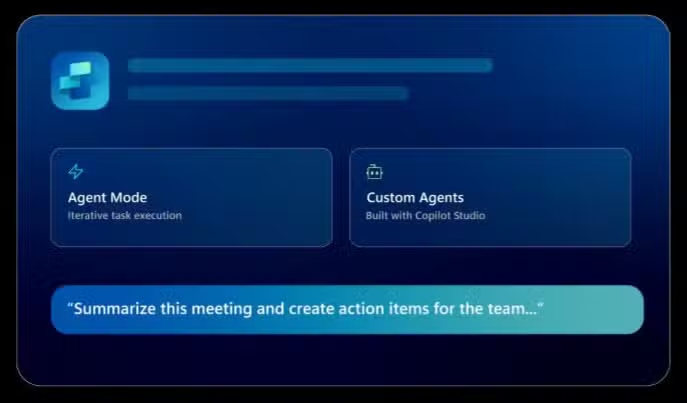
Build Custom Agents with Copilot Studio
Microsoft Copilot Studio is a low-code platform for creating, customizing, and deploying AI agents. Whether you need a customer service chatbot, an internal assistant, or a workflow automation agent, Copilot Studio makes it accessible.
Agents built in Copilot Studio can be used standalone or to extend Microsoft 365 Copilot with enterprise data and scenarios. With Work IQ integration, your custom agents inherit secure grounding, respecting permissions, compliance controls, and audit logging.
Best for: Teams who need agents tuned to their specific workflows and business systems, without extensive development resources.
Build agents with generative AI, describe what you need in plain language, and Copilot Studio generates the agent for you. Add instructions, knowledge sources, topics, and tools.
Connect
Link agents to your business data using prebuilt or custom connectors. Integrate real-time APIs, enterprise systems, and trigger agent flows from events or other agents.
Publish
Deploy agents across channels, websites, mobile apps, Teams, and more. Extend Microsoft 365 Copilot with custom agents tuned to your specific workflows.
Manage AI Agents at Scale with Agent 365
Microsoft Agent 365 is the unified control plane for managing and securing AI agents across your organization. Built on enterprise-grade identity, compliance, and observability foundations.
As agents become part of your workforce, Agent 365 ensures they behave securely, comply with enterprise standards, and integrate seamlessly with your existing governance frameworks.
Agent Inventory & Onboarding
Get a complete view of all agents in your organization, including registered agents, shadow agents, and those with agent IDs. Onboard and manage agents centrally.
Identity & Access Control
Each agent gets its own Microsoft Entra Agent ID for identity, lifecycle, and access management. Apply risk-based conditional access policies to prevent agent compromise.
Monitoring & Observability
Track agent behavior and performance in real time. Explore connections between agents, people, and data to assess impact on your organization.
Compliance & Data Security
Integrates with Microsoft Purview to apply data protection policies and audit agent activity. Protect data from oversharing, leaks, and risky agent behavior.
Threat Protection
Integrates with Microsoft Defender to detect, investigate, and respond to threats in real time. Protect agents from attacks that target AI systems.
Multi-Agent Governance
Govern multiple agents at scale, regardless of where they were built or acquired. Set policies, permissions, and controls across your entire agent ecosystem.
Volt helps set up agent governance so AI scales responsibly, from identity configuration to policy enforcement to ongoing monitoring.
Practical Use Cases by Role
Copilot meets people where they work, delivering AI assistance tailored to each role's unique needs and workflows.
Discover how Microsoft Copilot AI is transforming productivity, creativity, automation, and business insights through practical use cases and demonstrations.
Successful Copilot adoption isn't just about turning on a feature, it's about preparing your organization to use AI responsibly and effectively.
Microsoft emphasizes security, permissions, and compliance as core principles for Copilot and agents. Volt helps you build the foundation so AI works as intended, without surprises.
Copilot respects existing permissions and sensitivity labels
Agent 365 provides enterprise-grade controls and audit logging
Work IQ integrates securely with compliance and governance frameworks
Identity & Permissions Alignment
Ensure your Microsoft Entra ID and permissions structure is ready for Copilot. AI respects existing access controls, so getting permissions right is foundational.
Data Hygiene & Organization
Clean, well-organized data leads to better AI results. Review your SharePoint, OneDrive, and email organization to maximize Copilot's effectiveness.
Governance for Custom Agents
If you're building agents with Copilot Studio, establish governance early. Agent 365 helps manage identity, access, and compliance at scale.
Pilot-First Rollout
Start with a focused pilot, select high-value use cases, measure impact, gather feedback, and expand based on learnings. Don't boil the ocean.
Measurement & Optimization
Define success metrics upfront. Track adoption, time savings, and business outcomes. Use data to refine your Copilot strategy over time.
Why Volt for Copilot
Volt helps you adopt Copilot + agents the right way, with governance, security, and practical use cases at the core. We're not just deploying AI; we're helping you transform how work gets done.
AI-Forward Roadmap
We help you chart the path from Copilot adoption → custom agents → governed scale. Practical steps, not hype.
Copilot Studio Enablement
We build custom agents with you, identifying use cases, connecting data sources, and deploying agents that work.
Agent 365 Governance
We help configure agent identity, access controls, and monitoring—so your agents behave securely and in compliance.
Microsoft Ecosystem Integration
We connect Copilot across Business Central, Power Platform, Dynamics 365, and Microsoft 365, unified, not siloed.
Continuous Improvement
Adoption is just the start. We measure outcomes, refine use cases, and optimize your AI strategy over time.
Most Business Central projects do not fail because the software was the wrong fit. They stall because nobody wrote down what “ready to go live” means before work started. Finance assumed IT owned data migration. IT assumed the partner owned it. Four months in, the opening balances do not tie out and the date has slipped a quarter.
The Payables Agent caps at 100 emails a day. Attachments have to be under 5MB and no longer than ten pages.
Whether that works for you depends entirely on your AP volume, and those numbers appear nowhere near the announcement.
Most mid-market leaders have now sat through the Copilot demo. Someone from finance asks the obvious question afterwards and rarely gets a straight answer: what changes on Monday morning?
See how Kirsch International moved from spreadsheets to Microsoft Dynamics 365 Business Central and Volt 365 Apparel, with order entry now 5 to 10 times faster.
Discover how Volt Technologies built an AI agent for Microsoft Dynamics 365 Business Central, helping Loan Vision deliver faster support and smarter customer experiences.
This live session will explore how integrating Microsoft’s powerful ERP and CRM tools can transform how your business manages everything from financials and operations to sales and customer engagement.
Whether you’re a seasoned Business Central user or new to ERP solutions, this webinar will provide valuable insights, best practices, and live demos to help you take your business operations to the next level in 2025.
Gain actionable insights, learn best practices, and see how Business Central can help you close out 2024 on a high note and start 2025 with confidence.
Common questions about Microsoft Copilot, agents, and AI adoption.
What is Microsoft Copilot?
Microsoft 365 Copilot is an AI assistant embedded across Microsoft 365 apps—Word, Excel, PowerPoint, Outlook, Teams, and more. It's powered by Work IQ, the intelligence layer that combines your organization's work data, memory, and inference to deliver personalized, context-aware AI assistance.
What are AI agents in the Microsoft ecosystem?
Agents are AI companions that can handle a range of interactions and tasks, from resolving complex conversations to autonomously determining the best action based on instructions and context. Agents can be built with Copilot Studio and managed with Agent 365.
What is Copilot Studio?
Microsoft Copilot Studio is a low-code platform for creating, customizing, and deploying AI agents. You can describe what you need in plain language, connect agents to business data, and deploy them across websites, Teams, and other channels. Agents built in Copilot Studio can extend Microsoft 365 Copilot.
What is Agent 365?
Microsoft Agent 365 is the unified control plane for managing and securing AI agents at scale. It provides each agent with a Microsoft Entra Agent ID for identity management, integrates with Microsoft Purview for compliance, and Microsoft Defender for threat protection.
What is Work IQ?
Work IQ is the intelligence layer behind Microsoft 365 Copilot. It combines your work data (emails, files, meetings, chats), memory (your style, preferences, workflows), and inference (connections, insights, predictions) to deliver personalized AI experiences.
How does Copilot handle security and permissions?
Copilot respects your existing permissions, sensitivity labels, and compliance controls. It only surfaces information you have access to. Agent 365 adds enterprise-grade controls for agent identity, access management, and audit logging.
What is a Frontier Firm?
Microsoft's vision for organizations that are human-led and agent-operated. Frontier Firms empower every employee with an AI assistant, amplify impact with human-agent teamwork, and reinvent business processes with agents. This concept was introduced at Microsoft Ignite 2025.
How can Volt help with Copilot adoption?
Volt helps you identify high-value use cases, prepare your data and permissions foundation, build custom agents with Copilot Studio, configure governance with Agent 365, and measure outcomes over time. We take an AI-forward but governance-first approach
What Microsoft applications support Copilot?
Copilot is integrated into Word, Excel, PowerPoint, Outlook, Teams, OneNote, and more. It also works with Dynamics 365 applications (Sales, Customer Service, Finance, Supply Chain) and can be extended with custom agents built in Copilot Studio.
How do I get started with Copilot?
We recommend starting with a readiness assessment, reviewing your permissions structure, data organization, and identifying pilot use cases. Volt can guide you through this process and help you build a practical roadmap for Copilot adoption.
Volt helps you identify use cases, build trusted foundations, pilot agents with Copilot Studio, and govern them with Agent 365. Let's make AI practical for your organization.