
Production Order

Is ERP for me? A quick guide to reinventing business productivity

Is ERP for me? A quick guide to reinventing business productivity

Production Order

How do you know that your organization needs ERP software? The signs can be more subtle than you think, here are a few things to consider as your company grows.

As companies expand and their needs change, their systems should keep up. Here we’ll define what an ERP is and why it’s smart to have software in place that keeps up with your business needs.

First, what is enterprise resource planning (ERP)?

ERP is a category of business management software. ERP solutions encompass an integrated suite of applications that manage business practices, giving you the tools to manage your business in one fluid system.

While there is no all-in-one solution software for every business process, ERP is getting better at bringing processes together. Once your systems, processes, and data are connected, you will get the insight, intelligence, acceleration, and flexibility you need to start optimizing your operations.

Related: 6 Key ERP Implementation Best Practices​ | 2024


How can ERP improve my business?

The right ERP will help drive optimal performance.

Our solutions employ artificial intelligence (AI) to give you access to insights that drive faster, more accurate decision-making, improving your organization’s performance in both the short and long term.

ERP accelerates operational impact.

To stand out from the competition, businesses need to make every minute count and every customer engagement shine. By connecting your systems and data you are empowering your employees to make more informed decisions, and to make those decisions more quickly, allowing them to deliver more value company-wide.

Ensure Business Agility. 

Switching back and forth between fragmented, stand-alone solutions takes time and often requires duplicate data entry. This diminished productivity stifles your ability to scale and cuts into the time you could spend developing new business. Modern ERPs are built to scale easily, as well as to adapt to changing markets – giving you greater insight into any operational disruption or market change.

Now that we have reviewed the purpose and benefits of ERP, let’s dive into when it’s time to make the jump.

  • The basics aren’t giving you room to grow. Perhaps you’ve been doing fine with basics, but if your current software is putting limits on your market expansion and ability to grow on a global scale, it may be time for a better ERP system that does. To keep up the pace of your growth, you’re likely considering the move to a more comprehensive business management solution. Microsoft Dynamics 365 Business Central, helps you get through administrative tasks easily to you can focus on the big picture, and your team can spend more time taking care of customers.
  • Wasted time dealing with disparate systems. Right now, your employees might be the only common link between your business systems and the email, spreadsheet, and word-processing tools you use every day. This means there is time wasted flipping between apps or cutting and pasting, which can lead to data entry errors. As technology changes, you’re noticing that your disparate systems don’t work well together. You may notice that your new accounting software isn’t compatible with your old HR system, and you’re tired of wasting time and resources trying to stitch a solution together.
  • Inability to meet customer expectations. If your staff and customers are mobile and your system isn’t accommodating them, it’s time to invest in one that meets the needs of everyone. If you feel like you can’t afford to invest in meeting your customer’s expectations, and you’re not willing to give your staff the tools they need to succeed, you’ll lose them to a competing business pure and simple.

We understand that change can be hard. One of the ways to combat this is to schedule a time to speak with us to answer your questions and help you put together a game plan for your next steps.

How do you know that your organization needs ERP software? The signs can be more subtle than you think, here are a few things to consider as your company grows.

As companies expand and their needs change, their systems should keep up. Here we’ll define what an ERP is and why it’s smart to have software in place that keeps up with your business needs.

First, what is enterprise resource planning (ERP)?

ERP is a category of business management software. ERP solutions encompass an integrated suite of applications that manage business practices, giving you the tools to manage your business in one fluid system.

While there is no all-in-one solution software for every business process, ERP is getting better at bringing processes together. Once your systems, processes, and data are connected, you will get the insight, intelligence, acceleration, and flexibility you need to start optimizing your operations.

Related: 6 Key ERP Implementation Best Practices​ | 2024


How can ERP improve my business?

The right ERP will help drive optimal performance.

Our solutions employ artificial intelligence (AI) to give you access to insights that drive faster, more accurate decision-making, improving your organization’s performance in both the short and long term.

ERP accelerates operational impact.

To stand out from the competition, businesses need to make every minute count and every customer engagement shine. By connecting your systems and data you are empowering your employees to make more informed decisions, and to make those decisions more quickly, allowing them to deliver more value company-wide.

Ensure Business Agility. 

Switching back and forth between fragmented, stand-alone solutions takes time and often requires duplicate data entry. This diminished productivity stifles your ability to scale and cuts into the time you could spend developing new business. Modern ERPs are built to scale easily, as well as to adapt to changing markets – giving you greater insight into any operational disruption or market change.

Now that we have reviewed the purpose and benefits of ERP, let’s dive into when it’s time to make the jump.

  • The basics aren’t giving you room to grow. Perhaps you’ve been doing fine with basics, but if your current software is putting limits on your market expansion and ability to grow on a global scale, it may be time for a better ERP system that does. To keep up the pace of your growth, you’re likely considering the move to a more comprehensive business management solution. Microsoft Dynamics 365 Business Central, helps you get through administrative tasks easily to you can focus on the big picture, and your team can spend more time taking care of customers.
  • Wasted time dealing with disparate systems. Right now, your employees might be the only common link between your business systems and the email, spreadsheet, and word-processing tools you use every day. This means there is time wasted flipping between apps or cutting and pasting, which can lead to data entry errors. As technology changes, you’re noticing that your disparate systems don’t work well together. You may notice that your new accounting software isn’t compatible with your old HR system, and you’re tired of wasting time and resources trying to stitch a solution together.
  • Inability to meet customer expectations. If your staff and customers are mobile and your system isn’t accommodating them, it’s time to invest in one that meets the needs of everyone. If you feel like you can’t afford to invest in meeting your customer’s expectations, and you’re not willing to give your staff the tools they need to succeed, you’ll lose them to a competing business pure and simple.

Related: ERP Implementation Success: The Role of a Project Manager in Driving Change


We understand that change can be hard. One of the ways to combat this is to schedule a time to speak with us to answer your questions and help you put together a game plan for your next steps.

ERP Benefits
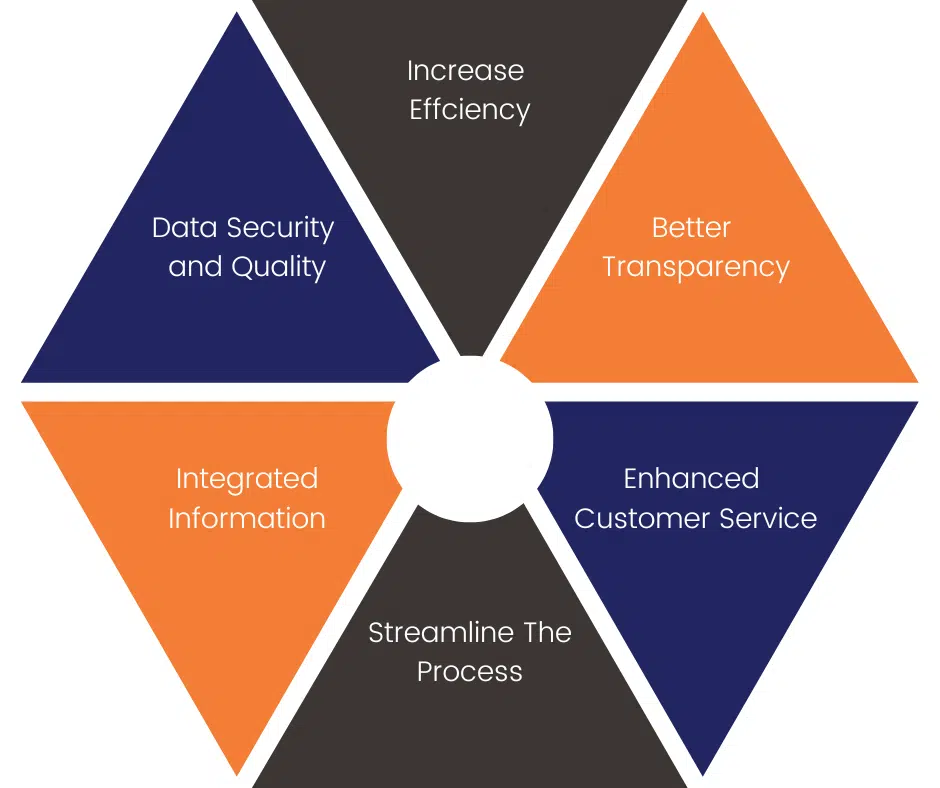
erp-benefits

Volt Technologies partners with organizations to simplify, standardize, and optimize their business processes with a combination of experience, innovation, and industry knowledge. We aim to build long-lasting relationships based on trust by helping you through every stage of your ERP implementation journey.

Microsoft Dynamics 365 Business Central vs Quickbooks Online

Business Central vs QuickBooks

Business Central vs QUICKBOOKS ONLINE

Microsoft Dynamics 365 Business Central vs Quickbooks Online
Mason-Whitaker-volt-president-1
About Author

Mason Whitaker

Microsoft Dynamics 365 | Simplify your IT footprint and make decisions faster.

What is Microsoft Dynamics 365 Business Central?

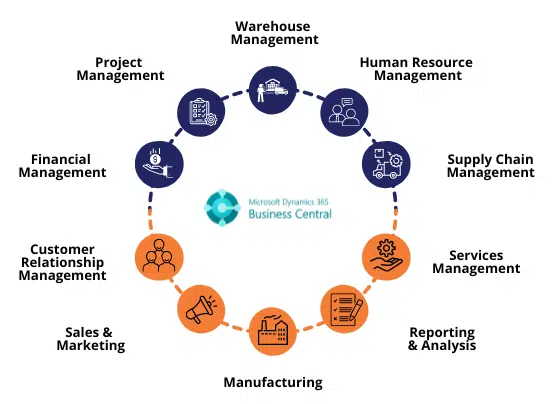
Microsoft Dynamics 365 Business Central is a cloud-based Enterprise Resource Planning (ERP) solution that helps small and mid-sized businesses manage their finances, sales, service, and operations. Business Central is an all-in-one business management solution that connects your finances to streamline business processes, improve customer interactions, and make better decisions.

Business Central includes financials, supply chain, manufacturing, sales, marketing analytics tools, and more. You can connect with Microsoft Dynamics 365 for Marketing to reach customers with tailored online ads based on past purchasing habits or with Microsoft Dynamics 365 for Talent to find the right employees in today’s competitive job market. Business Central also integrates with other Microsoft services like Azure Active Directory so you can get a better understanding of who your customers are across multiple channels. With this comprehensive solution in place, you can feel confident knowing that you are operating your business safely and efficiently—so you can stay focused on what matters most: serving your customers’ needs.

What is QuickBooks Online?

QuickBooks Online is a cloud-based accounting software, providing small business and accountant customers with the ability to store transactions, manage accounts, view transactions by date or category, and generate reports in real-time. QuickBooks Online is popular among small businesses that want to increase their efficiency by reducing paperwork; it provides customizable features such as multiple users and multiple companies.

How does Microsoft Dynamics Business Central compare to QuickBooks Online for basic accounting and financial features?

The Microsoft Dynamics 365 Business Central Financial Management solution is a feature-rich, cloud-based accounting and financial management system. For many businesses, it will adequately meet their needs for basic accounting and financial services.

What do we mean by “basic accounting and financial services”? These are the types of things you’d use to record what your business spends money on, produce reports on how much you spent over a specific period of time (a month, a year), and produce reports on what your business made in revenue during that same time period. If you’re an accountant or bookkeeper for your own small business, these tools are all you need to manage all the numbers in your business.

The QuickBooks Online Financial Management solution is an entry-level accounting solution. The number of features available in this solution will likely suit most small businesses’ needs; however, if your business needs more advanced features such as inventory tracking or sales pipeline reporting capabilities then this won’t be the best fit for your company.

How does Microsoft Dynamics Business Central VS QuickBooks Online COMPARE For inventory management features?

Microsoft Dynamics 365 Business Central vs QuickBooks Online have completely different focuses. Microsoft Dynamics is an Enterprise Resource Planning (ERP) application that offers value-added features like CRM, supply chain management, project portfolio management, and more. QuickBooks Online is an accounting software that helps you manage your finances through basic bookkeeping and invoicing, but it doesn’t offer the extra features of Microsoft Dynamics. Comparatively speaking, Microsoft Dynamics is a more complex system with more customization options than QuickBooks Online.

QuickBooks Online does not have as many functionalities or support options compared to other ERPs or accounting systems on the market. You can count on a streamlined experience to keep your business organized and running smoothly. However, if you’re looking for something with a little more complexity to handle special inventory considerations (like managing multiple warehouses), then you might want to consider exploring other options in this group test; some of which offer the ability to cover international orders or manage multiple companies from one platform.

How does Microsoft Dynamics Business Central  VS QuickBooks Online COMPARE for reporting and business intelligence features?

Data is key to any business and Microsoft Dynamics 365 Business Central vs QuickBooks Online keeps track of your numbers in different ways. Microsoft’s standalone ERP solution contains a number of useful reports for users who want to look at their finances from a top-down perspective. The reporting section was designed with users in mind who need answers now and don’t have time to scour through mountains of data every night. Meanwhile, QuickBooks Online offers several customizable reports that focus on financial details at a lower level than Dynamics, making them ideal for reading through ledgers with your accountant or doing a detailed analysis on an ongoing basis. How many teams are involved in each solution?

Microsoft Dynamics 365 Business Central is designed for small-to-medium organizations that can benefit from having multiple departments all talk to the same solution using one interface. With this product, you can create as many user groups as necessary so that individuals working within finance, sales, warehouse management, or any other department can use their own unique logins without interfering with each other’s workflows—for example, if a group wanted access to numbers relevant only to their department on a regular basis but not things like documents or contracts stored by another team. The ability for all departments to separately view pertinent information is more accessible than ever before because Microsoft implemented new security features built around blockchain technology (though it relies mainly on activity monitoring, not cryptocurrency). In comparison, QuickBooks Online is designed for smaller businesses whose needs are simpler and don’t involve separate teams working toward similar goals throughout the day—for example, an accounting firm or personal business owner running everything alone without help from co-workers or associates.

Should you purchase Microsoft Dynamics 365 Business Central VS QuickBooks Online?

Microsoft Dynamics 365 Business Central requires more upfront work from its users than QuickBooks Online does. However, Business Central offers much more customization than QuickBooks Online does; after completing the setup process once, you no longer need to enter most fields again because they will already have been stored as template entries (a feature that is somewhat lacking in QuickBooks Online).

Business Central also offers more advanced features than many other accounting services do when it comes to planning for taxes and projecting future cash flow; this makes it worthwhile even if you won’t be filing taxes or forecasting with it right away. All these extra details add up to create an experience that is likely better suited for startups or small businesses that will outgrow its capabilities later on anyway; plus, those initial hours spent setting up templates from scratch could save hours each month later on by getting rid of data entry tasks (which means saving money since there’s no pay associated with doing them).

microsoft-dynamics-365-business-central-9
Microsoft Dynamics 365 Business Central vs Finance and Operations

Business Central vs Finance and Operations

Business Central vs Finance and Operations

Microsoft Dynamics 365 Business Central vs Finance and Operations
Mason-Whitaker-volt-president-1
About Author

Mason Whitaker

Microsoft Dynamics 365 | Simplify your IT footprint and make decisions faster.

Why is it that Microsoft has 2 ERP systems? What are their different capabilities? Their price? Their implementation strategy?

That's what I'm here to help answer for you.

Businesses are nothing without their systems.

Think about it.

When you get down to the core of what makes any business thrive, you’ll quickly see that without the systems created by their founders & everyday workers there is nothing left but ideas. How we collect revenue, pay our expenses, and procure our inventory, the collection of these processes makes or breaks a business.

This is why it is critical to provide your business with an intelligent system that promotes best practices and enhances operational efficiency as opposed to stifling that efficiency.

That’s where Microsoft Dynamics 365 comes in.

Dynamics 365 is a portfolio of products that was created by Microsoft to enable organizations to execute all their business operations underneath a single platform. Regardless of what business function, Dynamics 365 has it covered with financials, sales, purchasing, project, warehousing, field service, manufacturing, retail, etc. The list goes on and on in terms of the capabilities served by the overall Dynamics 365 platform.

While there are dozens of applications in the Dynamics 365 family, there are only 2 enterprise resource planning systems (ERPs).

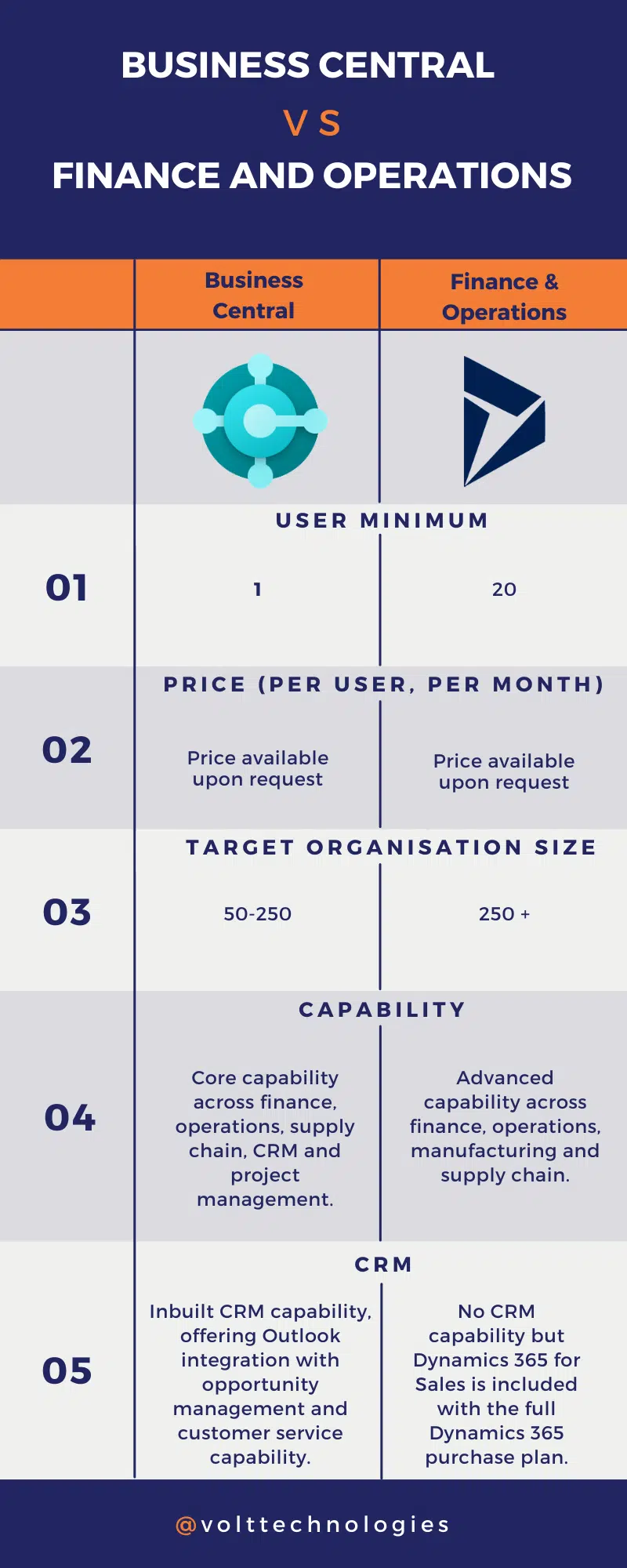
Business Central (BC) is an ERP that Microsoft deployed specifically for the small to mid-size market (which internally we classify as ~500K -> ~150M in annual revenue) while Finance & Operations (F&O) was deployed for the large to enterprise market (~150M+ in annual income).

Business Central and Finance & Operations both are end-to-end integrated ERP solutions with modules covering Financials, Sales, Purchasing, Warehousing, Manufacturing, Projects, and much more; however, they differ in their capabilities, capacity, price, and implementation strategy.

Capabilities

Since Business Central was created for the small to mid-size market, it contains less functionality than that of Finance & Operations.

Business Central contains all the core functionality that is required for small to mid-size companies to operate their business efficiently without the added systemic complexity that is required by more giant corporations.

For example, Business Central and Finance & Operations both have the functionality to track and move inventory at a location/bin level within a warehouse.

However, Finance and Operations give you out of the box the ability to use mobile devices, optimize picking routes, consolidate loads, and many other things that smaller companies don’t necessarily need. Business Central users can still add these functionalities, but it may require an extension or possible integration with a third-party provider.

These are just a few examples of how Business Central and Finance & Operations differ in their capabilities. Still, it is easy to remember that Business Central has all the breadth of Finance & Operations, but not the same amount of depth in terms of capabilities.

However, that depth comes at a cost.

PRICING

Starting at $70 a month per user with a minimum requirement of only a single user to get started, Business Central has one of the lowest cost barriers of any ERP on the market today, certainly lower than that of Finance & Operations.

Finance & Operations licenses start at $180 a month per user with a minimum requirement of 20 users, which is a floor price of $3,600 a month to get in the door.

The licenses are not the only area where Business Central and Finance & Operations differ in terms of price, these differences also exist on the implementation side as well.

Due to Business Central’s “no-fluff” approach, implementations are fast-paced and focused on change management and end-user adoption as opposed to system configuration. This drastically cuts down the implementation timeline and makes it easier for the Microsoft partner to implement. On average, Business Central projects take 4-6 months from project kickoff to end users’ live operation in production. Depending on what capabilities are required from the implementation, some projects only take a matter of a few weeks and are offered as packages as opposed to normal bi-weekly consulting billing.

Finance & Operations projects have longer lead times for configuring and deploying to ensure that the company’s current business processes are mapped into the system as there is more functionality that is required to implement. This approach is focused on ensuring a company’s current business processes are mapped into the system and requires deep expertise in the Finance & Operations systems to map. Thus, this implementation style inherently comes with a heavier price tag, and average implementations last between 9 to 12 months.

CAPACITY

Due to the lower price tag, Business Central does have limitations around the technical capacity of the system. As a general rule, if you are processing hundreds of thousands of transactions in a given month, then it is likely you are not fitted for Business Central. Processing these workloads puts strains on the system and leads to an overall system performance problem which is only solved by upgrading to Finance & Operations.

However, if you are processing just several thousand transactions monthly, you are a good fit for Business Central.

These limits on transactions are not just for performance, but also apply when speaking to the limitations on database size. Business Central tops out at 80GB of ERP storage (with the ability to purchase additional space).

Though this limitation is often mitigated during Business
Central implementations by publishing historical data to an external data warehouse are still something to be aware of when implementing Business Central.

ComPARISON

BUSINESS CENTRAL VS FINANCE AND OPERATIONS