
Introduction
Business Central pricing is not a secret. Microsoft publishes it directly on its pricing pages and in its free Dynamics 365 Licensing Guide. Licenses run from $8 to $110 per user per month depending on the tier. Even so, most ERP buyers still spend weeks chasing a sales call to confirm numbers that are already public. That transparency is real, but the sticker price is not the whole story. The gap between the license fee and the real cost of running the platform is where most implementations go over budget. Buyers who search “Dynamics 365 Business Central cost” or “Business Central licensing 2026” usually land on vague partner landing pages instead of a clear breakdown. We are publishing the real one, along with everything the number leaves out.
This guide breaks down exactly what Business Central pricing includes, what it does not, and how the real cost of running the platform compares to the monthly number on Microsoft’s price list.
What Is Business Central Pricing?
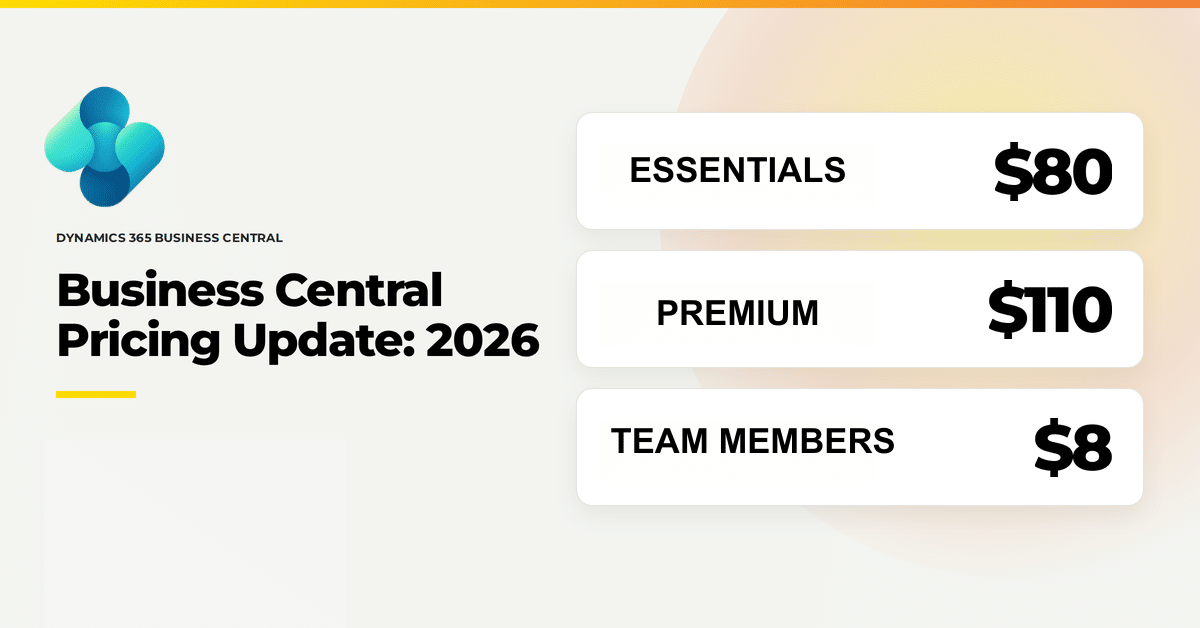
Business Central pricing is the per user, per month licensing fee Microsoft charges for its cloud ERP platform, split across three tiers: Essentials ($80), Premium ($110), and Team Members ($8). Implementation, data migration, customization, and ongoing support are billed separately by a partner like Volt.
What Business Central Pricing Actually Looks Like in 2026
Here is the current published pricing structure for Microsoft Dynamics 365 Business Central, direct from Microsoft’s licensing model:
- Free Trial: 30 days, full platform access, no credit card required
- Essentials: $80 per user per month, includes financial management, sales and CRM, supply chain, project management, and Microsoft Copilot
- Premium: $110 per user per month, includes everything in Essentials plus manufacturing and service management
- Team Members: $8 per user per month, read access, workflow approvals, and limited data entry
- Device: $45 per device per month, for shared workstations such as warehouse terminals and shop floor kiosks
That $30 gap between Essentials and Premium looks small on a single seat. Multiply it across 40 users and you are looking at over $14,000 a year for capabilities you may not need. This is where licensing decisions either save a company real money or waste it, and it comes down to matching the tier to the actual workflow, not the department headcount. Scale that same mismatch to a 300-user company and the gap compounds into a six-figure line on the annual budget.
Essentials vs Premium: Which License Do You Need
The Essentials versus Premium decision is the single most common licensing question we get from prospective clients. Here is the direct comparison.
| Feature | Essentials ($80/user/mo) | Premium ($110/user/mo) |
|---|---|---|
| Financial management | Included | Included |
| Sales and CRM | Included | Included |
| Supply chain and warehouse management | Included | Included |
| Project management | Included | Included |
| Manufacturing | Not included | Included |
| Service management | Not included | Included |
| Microsoft Copilot | Included | Included |
If your business runs production, whether that is bill of materials management, work order scheduling, or shop floor capacity planning, you need Premium. Standard Essentials licensing simply does not cover manufacturing functionality, and there is no add-on that unlocks it inside the lower tier. If you are a distributor, a professional services firm, or a retailer with no production floor, Essentials covers the full operational stack including Copilot, and paying for Premium is paying for modules you will never open.
The mistake we see most often: companies default every user to Premium because a handful of employees touch manufacturing screens. A 60-person company with 8 people on the shop floor does not need 60 Premium licenses. It needs 8 Premium licenses and 52 Essentials or Team Members licenses, assigned by function. We walk every new client through this exact exercise before a single license gets purchased, because it is the fastest way to cut a proposed budget without cutting capability.
Team Members Licensing: The Tier Everyone Misprices
Team Members licensing, at $8 per user per month, is the most misunderstood line item in the entire cost structure. It is built for employees who need to see data, approve a purchase order, or update a handful of fields, but who do not run transactions, post journal entries, or manage records day to day.
Warehouse staff confirming a pick, managers approving expense reports, and executives pulling up a dashboard all fit the Team Members profile. Companies that assign full Essentials licenses to every employee touching the system are routinely overpaying by up to $72 per user per month for access those employees never use. On a 100-person deployment with 30 approval-only users, that is over $25,000 a year sitting on the table, and it is one of the first things we check when a prospective client says their current ERP spend feels too high, whether that client is a manufacturer, a distributor, or an apparel brand.
What’s Included vs What Costs Extra
The published price list covers the platform itself. It does not cover everything a real deployment needs.
Included in every Essentials and Premium seat
- Microsoft Copilot, embedded directly in the platform with no separate license required
- Core financial, sales, and supply chain modules
- Standard Power BI reporting
- 1,000-plus native integrations, including the Shopify Connector
Not included in the standard license fee
- Industry-specific ISV solutions and vertical extensions, such as Volt 365® Apparel for fashion and footwear brands, along with manufacturing and distribution add-ons like advanced warehouse management or EDI connectors
- Implementation services: discovery, configuration, data migration, and testing
- Custom development or Power Platform automation beyond what is native
- Training and change management
- Ongoing support beyond what Microsoft includes at the platform level
This is the part that catches buyers off guard. The $80 or $110 monthly figure is a subscription fee for software access. It is not a project budget. A company evaluating Business Central pricing needs to budget for the license and, separately, for the implementation partner who configures the system, migrates the data, and trains the team. Skip that second budget line and the project stalls the moment the first invoice for configuration work lands on someone’s desk who was not expecting it.
Additional Environments and Database Capacity
Business Central pricing already includes more infrastructure than most buyers realize before they ever add anything extra. Every Essentials or Premium subscription comes with 4 environments out of the box: 1 production environment and 3 non-production (sandbox) environments, with room for up to 300 companies within a single environment.
Database storage works the same way. Every tenant gets 80 GB of shared database capacity included at no charge, on top of per-user accrual that scales with headcount: 3 GB per Essentials user, 5 GB per Premium user, and 1.5 GB per Business Central Device license, all pooled at the tenant level.
When a company outgrows those defaults, Microsoft prices the add-ons separately:
- Additional Environment add-on: Additional Environment add-on: $360 per month, which adds 1 production environment, 3 more sandboxes, and 4 GB of database capacity
- Additional Database Capacity: $10 per GB per month
Most Business Central deployments never touch these add-ons in year one. They tend to come up for fast-growing companies running multiple sandboxes for testing, or for data-heavy manufacturers and distributors whose transaction history outpaces the included accrual after a few years live.
Volt 365® Apparel Pricing
For fashion, footwear, and apparel brands running Volt 365® Apparel on top of standard Business Central, pricing starts at $2,500 per month and includes 25 users. Additional users can be added beyond that for an incremental cost. Learn more about the platform on our Volt 365® Apparel page.
How Business Central Pricing Is Calculated: A Step-by-Step Process
- Count your named users by function. Separate transaction-heavy roles (finance, sales, warehouse operators) from approval-only roles (managers, executives, occasional viewers).
- Assign tiers by workflow, not by department. Manufacturing and service management functions require Premium. Everyone else likely fits Essentials or Team Members.
- Add ISV and industry modules where relevant. This applies across verticals, not just apparel: distributors adding warehouse management extensions, manufacturers adding shop-floor connectors, and fashion or footwear brands running Volt 365® Apparel will all see additional licensing lines beyond the standard per-user fee.
- Get an implementation scope and quote from your partner. This covers discovery, configuration, data migration, integrations, and training, and it is typically the largest line item in year one.
- Model year one versus year two costs separately. Year one includes implementation. Year two is largely licensing plus support, which is why total cost of ownership drops significantly after go-live.
- Revisit the tier assignment annually. Roles change, headcount grows, and a license mix that fit at go-live rarely fits three years later without a checkup.
How Business Central Pricing Compares to NetSuite and Acumatica
| Solution | Starting Price Model | Public Pricing |
|---|---|---|
| Business Central (Essentials) | $80/user/month | Published by Microsoft and partners |
| Business Central (Premium) | $110/user/month | Published by Microsoft and partners |
| NetSuite | Custom quote, typically $99+/user/month plus base platform fee | Not published |
| Acumatica | Usage-based, not per-user | Not published |
Business Central pricing is transparent by design because Microsoft publishes it directly. NetSuite prices by custom quote and layers a base platform fee on top of per-user costs, which makes apples-to-apples comparison difficult until you are deep in a sales cycle. Acumatica prices by usage rather than by named user, which can favor larger teams but makes early budgeting harder for companies that do not yet know their transaction volume. That transparency alone shortens the evaluation process by weeks for most buyers we work with.
Challenges and Limitations in the Business Central Pricing Model
The license cost is straightforward at the sticker-price level and less straightforward at the deployment level. A few real limitations worth naming directly:
- Per-user pricing scales linearly, which means growth increases your license bill every time you add headcount, regardless of whether the new hire is a power user or an approval-only viewer.
- Tier mismatches are common. Companies frequently license more Premium seats than they need because nobody audits actual usage after the initial rollout.
- The published price list does not include Dataverse consumption, Power Platform premium connectors, or Azure costs that some AI and automation scenarios require.
- ISV add-ons, whether that is Volt 365® Apparel for a fashion brand or a warehouse management and EDI connector for a distributor or manufacturer, carry their own licensing on top of the base subscription, which needs to be modeled early, not discovered mid-project.
- Multi-entity companies sometimes assume licensing consolidates across subsidiaries automatically. It does not. Each environment and each named user needs to be accounted for separately in the total.
None of these are reasons to avoid the platform. They are reasons to have a partner model the full cost before you sign, not after.
Why Volt Technologies for Business Central Pricing and Licensing
Volt Technologies has spent more than 30 years in Microsoft ERP, and we are an 11x Microsoft Inner Circle member, placing us in the top 1% of Business Applications partners worldwide. We do not just quote a number off the price list. We model total cost of ownership across licensing, implementation, and the decade-plus horizon that an ERP decision actually represents.
Four things separate how we handle Business Central pricing and licensing from a generic reseller:
- Vertical expertise across manufacturing, distribution, and apparel. We built Volt 365® Apparel specifically for fashion and footwear brands, and we bring that same operational depth to manufacturers and distributors evaluating Premium-tier production and warehousing modules.
- A hands-on engagement model. We do not hand you a quote and disappear. We sit in the license-tier conversation with you, function by function.
- Enterprise pedigree applied to the mid-market. Our team has run large-scale Microsoft deployments and brings that discipline to companies with 50 to 500 employees.
- 24/7 follow-the-sun support. Licensing decisions do not stop mattering after go-live, and neither does our support desk.
We have run 460+ successful Microsoft implementations, and in nearly every one, the client’s first licensing assumption changed once we mapped actual user roles against the tiers. That mapping exercise alone often pays for itself within the first year.
Ready to calculate your Business Central costs?
Frequently Asked Questions
Business Central pricing runs $80 per user per month for Essentials, $110 per user per month for Premium, and $8 per user per month for Team Members, based on Microsoft's published 2026 licensing.
Yes. Microsoft Copilot is included in both Essentials and Premium licenses at no additional cost, and it is one of the reasons the platform has held its value while competitors charge separately for AI features.
No. Business Central pricing on Microsoft's price list covers software licensing only. Implementation, data migration, training, and ongoing support are billed separately by your implementation partner.
Essentials covers financial management, sales, supply chain, project management, and Copilot. Premium includes everything in Essentials plus manufacturing, service management, and advanced warehousing, for $30 more per user per month.
Yes. Most successful licensing strategies assign tiers by function. A single company commonly runs a mix of Premium, Essentials, and Team Members licenses depending on what each employee actually does in the system.
Yes. Volt 365® Apparel is an ISV solution built on top of standard Business Central and carries its own licensing, separate from the base Essentials or Premium tier. Pricing starts at $2,500 per month and includes 25 users.
Most implementations take 3 to 6 months, following a Discover, Design, Implement, Train and Adopt, and Optimize process. Implementation cost is separate from ongoing Business Central pricing and is typically the largest expense in year one.
Getting Business Central Pricing Right the First Time
Business Central pricing is public, predictable, and simple to read on a price list. What is not simple is matching license tiers to real usage, budgeting for the implementation work that sits outside the monthly fee, and accounting for ISV modules like Volt 365® Apparel when they apply to your industry. Get that mapping wrong and you either overpay for capability you never use or underbudget for a rollout that costs far more than the license line suggested.
Volt Technologies has spent more than three decades getting this right for growing manufacturers, distributors, and apparel brands. If you want a Business Central pricing model built around your actual team, not a generic per-seat estimate, talk to a Volt consultant.
